HostSpica security design report, version 1
SHORT ANSWER
What does the HostSpica security design report say?
It describes how HostSpica Authenticator, Passkey and Identity keep secrets on the phone with Android Keystore keys, biometric checks and no internet permission; what we tested; and what we know is weak, including no independent audit, no FIDO certification and a clipboard clear that is less reliable than described. It is our own report for HostSpica Identity 1.0.0.
Key takeaways
- This is a self-assessment, not an audit. No third party has reviewed the apps.
- The design relies on Android: Keystore for keys, BiometricPrompt for user checks, the app sandbox for isolation.
- We have 80 automated unit tests and a set of manual checks on real devices. Both are listed with their limits.
- Known weaknesses are listed in one place so you do not have to find them.
1. Scope and status
This report covers HostSpica Identity 1.0.0 for Android, which contains the Authenticator, Passkey, AirAuth and Vault features, and the standalone HostSpica Authenticator and Passkey apps where they share code. It was written on 4 October 2026 by the people who built the apps. It is our own assessment. It is not an audit, and no independent party has reviewed it. HostSpica Passkey is not FIDO certified.
2. What we protect
- 2FA secrets and Vault passwords and notes (confidentiality).
- Passkey private keys (confidentiality and non-exportability).
- The act of signing in and of filling a password (only you can approve it).
- Backup files (confidentiality and tamper detection).
3. Architecture in brief
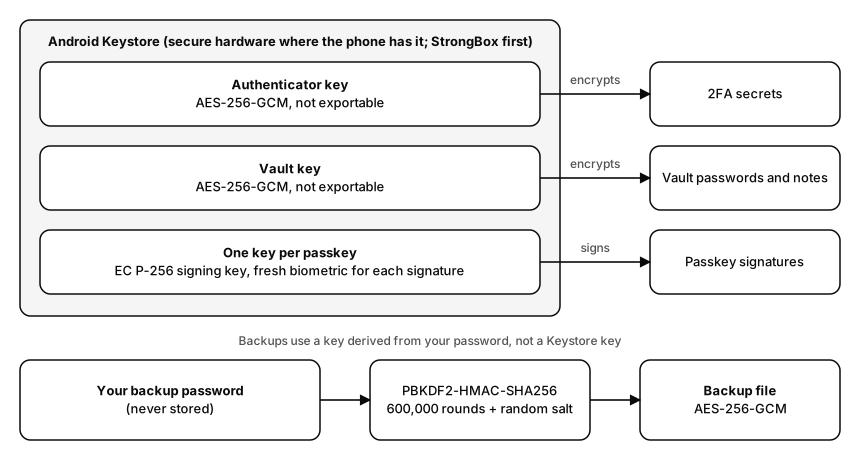
Each feature stores its data in its own local database inside the app's private storage. Secrets are encrypted with AES-256-GCM under keys that Android Keystore holds; passkeys use one hardware-backed P-256 signing key each. The app declares no internet permission, so it cannot send data over the network itself. Details: where every secret lives.
4. Controls and their evidence
| Control | How it works | Evidence | Limit |
|---|---|---|---|
| No network access | No INTERNET permission in the merged manifest | Checked with aapt2 on the release build; method published | Android's own cross-device passkey flow is run by the system, not by the app |
| Secrets at rest | AES-256-GCM, Keystore keys, separate keys for Authenticator and Vault | Code review; encrypt and decrypt tests | Labels (issuer, title, username, site) are stored unencrypted for search |
| App lock | Fingerprint, face or screen lock on open; configurable time in background | Manual device checks of both Immediately and timed modes | A known screen-lock PIN also unlocks |
| Passkey signing | Per-key Keystore signing, fresh biometric for each signature, origin from privileged browsers | Registered and signed in on Google, GitHub, Microsoft and webauthn.io | ES256 only; native-app callers not reviewed |
| Autofill | Placeholders only; real values released after a biometric check; exact registered domain on web | Unit tests for lookalike domains; manual save and fill checks | No gate if the phone has no screen lock |
| Backups | PBKDF2-HMAC-SHA256 600,000 rounds, AES-256-GCM | Round trip, wrong password and tamper tests | Password strength is the whole defence |
| Screen capture | Secure-window flag on the app window | Manual check that screenshots are blocked | Camera or accessibility capture not stopped |
| Clipboard | Sensitive flag and 30-second clear for Vault copies | Manual checks | Authenticator code copies are not reliably cleared; see below |
5. Testing
- Automated: 80 JVM unit tests (as of 3 October 2026): the RFC 4226 and RFC 6238 test vectors, Google export decoding, backup crypto, site matching, authenticator data layout and signing, passkey request handling.
- Manual, on one Android 16 phone: Autofill save and fill, backup and restore with wrong and right passwords, the release build with R8, passkey registration and sign-in on Google, GitHub, Microsoft and webauthn.io with Chrome and Brave, refusing duplicate passkeys on webauthn.io and GitHub, the standard cross-device flow listing HostSpica Identity.
- Not tested: other phones and Android versions; Firefox and Edge; a complete sign-in on a computer through Android's cross-device flow; penetration testing; fuzzing; side-channel analysis.
6. Known weaknesses
- No independent security audit.
- Not FIDO certified; our own AirAuth Bluetooth protocol is not a FIDO transport and is unreviewed.
- The 30-second clipboard clear for Authenticator codes depends on the screen staying open (see clipboard and screenshot protections).
- Unencrypted labels in the private database.
- Passkey keys may be invalidated by Android if a new fingerprint is enrolled; untested.
- A compromised or rooted phone defeats on-device protections.
- ES256 is the only passkey algorithm, and native-app callers have not been reviewed in detail.
7. Changes since design
Security-relevant changes are listed in the security changelog, including the Autofill domain-match fix, the passkey request-handling changes and the removal of our custom Bluetooth passkey flow.
8. Reporting a problem
See the disclosure policy. Write to [email protected].
Download this report as a PDF: hostspica-security-design-report-v1.pdf.
Frequently asked questions
Is this report an audit?
No. It is our own assessment. We say so first, because it matters.
Will the report be updated?
Yes, with each release that changes a protection. The version number changes when the content does.
Can I cite it?
Yes. Cite the version and date. A permanent DOI may come later; we will say so here if it does.
References
Review status
Last technical self-review by the author on 4 October 2026. No independent reviewer yet. If you spot an error, write to [email protected] and we will correct it and note the change.
Rohan builds HostSpica's Android apps — Authenticator, Passkey and Identity — and writes up how they work, including the mistakes along the way.
ABOUT THE PRODUCTS
RELATED